[v15.0] DISTANCE command not showing Delta X, Y, Z coordinates
Posted: Tue Sep 15, 2026 4:11 am
Hi everyone,
I recently upgraded to CMS IntelliCAD 15.0 and noticed an issue with the DISTANCE command (Inquiry toolbar).
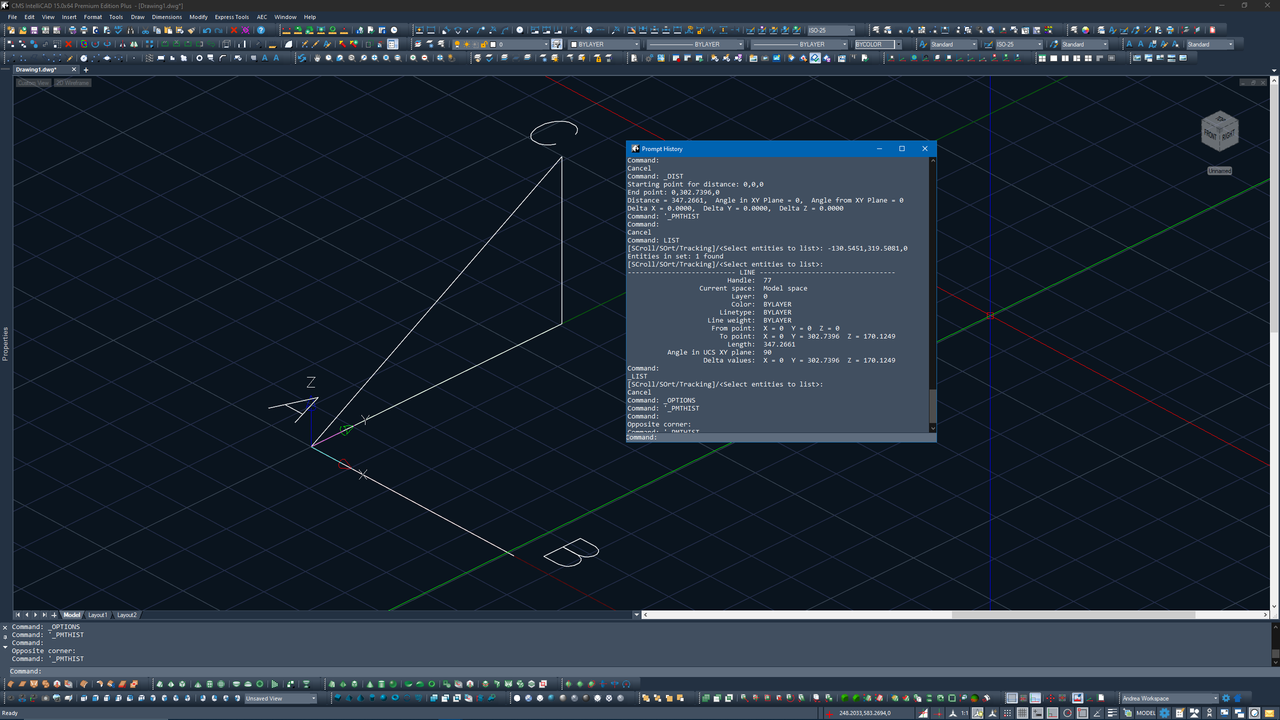
When measuring between two points (e.g., from Point A to Point C in 3D space), the command line output only shows the total 3D distance, but fails to print the Delta X, Delta Y, and Delta Z components. It also seems to ignore the Z elevation of the target point.
In previous versions, the DISTANCE command always listed the delta values, which is extremely useful for checking offsets between different levels without drawing auxiliary lines.
Here is a screenshot showing the issue:
What I've tried so far:
Performed a full reset to default settings (no change).
Has anyone else experienced this in v15.0? Is there a system variable controlling the verbosity of the DISTANCE command output, or is this a known bug in the new release?
Thanks in advance for any insights!
I recently upgraded to CMS IntelliCAD 15.0 and noticed an issue with the DISTANCE command (Inquiry toolbar).
When measuring between two points (e.g., from Point A to Point C in 3D space), the command line output only shows the total 3D distance, but fails to print the Delta X, Delta Y, and Delta Z components. It also seems to ignore the Z elevation of the target point.
In previous versions, the DISTANCE command always listed the delta values, which is extremely useful for checking offsets between different levels without drawing auxiliary lines.
Here is a screenshot showing the issue:
What I've tried so far:
Performed a full reset to default settings (no change).
Has anyone else experienced this in v15.0? Is there a system variable controlling the verbosity of the DISTANCE command output, or is this a known bug in the new release?
Thanks in advance for any insights!