Page 1 of 1
Unable to Access Architectural Tools
Posted: Mon Nov 13, 2023 11:11 am
by BulkHT
Just activated my licensee for the 1st time and after I open a new drawing and I go to insert a foundation wall. I get the error shown below. Is there something I need to turn on to activate it?
Re: Unable to Access Architectural Tools
Posted: Tue Nov 14, 2023 7:29 am
by QuanNguyen
Hi,
Which version of the IntelliCAD do you use now?
As I know, only the "IntelliCAD Premium Edition Plus" supports AEC entities such as walls, windows, doors, openings, stairs, railings & slabs, etc.
Regards,
Re: Unable to Access Architectural Tools
Posted: Tue Nov 14, 2023 12:47 pm
by BulkHT
I did buy the CMS IntelliCad PE 11.1 Plus.
Re: Unable to Access Architectural Tools
Posted: Tue Nov 14, 2023 6:10 pm
by QuanNguyen
Please verify that the system variable "AECOBJECTS" is set to 1.
Re: Unable to Access Architectural Tools
Posted: Wed Nov 15, 2023 1:07 am
by sln8458
Hi Quan,
I have this same problem, noticed when I tried to load _steel, I get the same error.
I have PE+ (11.1.435.145443.PE+).
I'm hoping that release 12.0 solves this.
SteveN
PS
I have reported the issue some time back [ID: 4709]
Re: Unable to Access Architectural Tools
Posted: Wed Nov 15, 2023 3:04 am
by QuanNguyen
Hi Stephen,
I have the PE+ (11.1.435) too.
the AEC works as they are on my PC.
Please try to reinstall it again.
Regards.
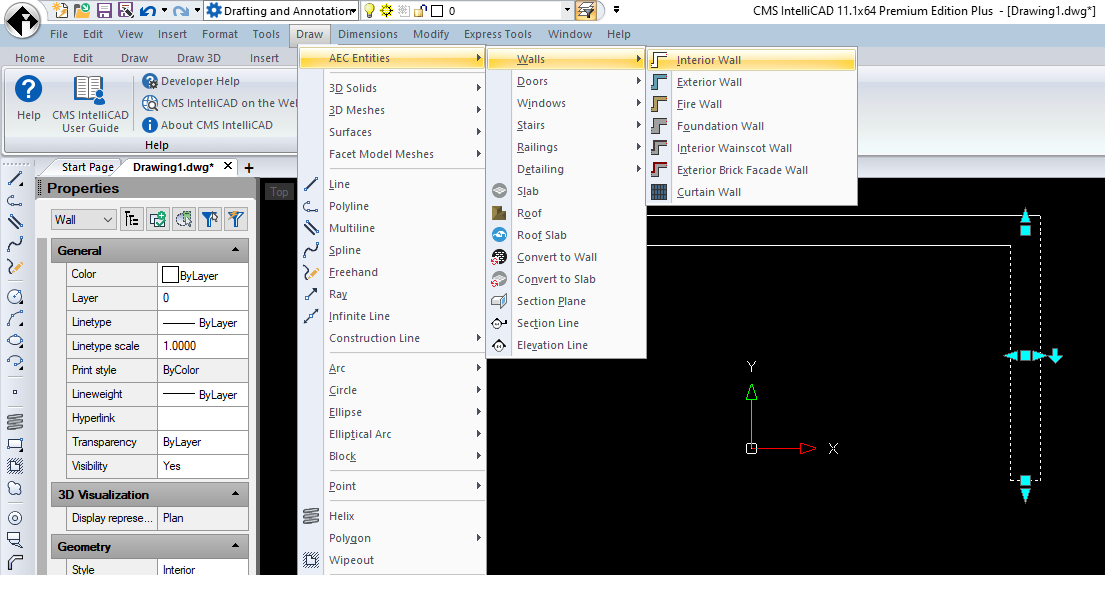
- AEC entity.png (69.19 KiB) Viewed 66140 times
Re: Unable to Access Architectural Tools
Posted: Wed Nov 15, 2023 3:24 am
by sln8458
I did that, about 5 times, CCleaner between each one.
Still no change!!
Re: Unable to Access Architectural Tools
Posted: Wed Nov 15, 2023 9:49 am
by BulkHT
QuanNguyen wrote: ↑Tue Nov 14, 2023 6:10 pm
Please verify that the system variable "AECOBJECTS" is set to 1.
AECOBJECTS was showing off and I turned it on and no difference. Still not recognizing the commands.
Re: Unable to Access Architectural Tools
Posted: Wed Nov 15, 2023 10:54 am
by sln8458
BulkHT wrote: ↑Wed Nov 15, 2023 9:49 am
QuanNguyen wrote: ↑Tue Nov 14, 2023 6:10 pm
Please verify that the system variable "AECOBJECTS" is set to 1.
AECOBJECTS was showing off and I turned it on and no difference. Still not recognizing the commands.
Do you get the dropdown menus as per Quan?
or like mine?
SteveN
Re: Unable to Access Architectural Tools
Posted: Wed Nov 15, 2023 10:59 am
by BulkHT
sln8458 wrote: ↑Wed Nov 15, 2023 10:54 am
Do you get the dropdown menus as per Quan?
or like mine?
SteveN
I get the same drop down menu as Quan but none work.
Re: Unable to Access Architectural Tools
Posted: Wed Nov 15, 2023 11:25 am
by BulkHT
UPDATE!!!!
I now have it working. I uninstalled the program and reinstalled it with "RUN AS ADMINSTRATOR" and now it is working. I may not have originally installed it as administrator.
Re: Unable to Access Architectural Tools
Posted: Fri Sep 20, 2024 2:20 am
by serena23
The error message Unable to recognize command WALL indicates that the WALL command is not available or recognized in your IntelliCAD environment. To resolve the issue, try restarting IntelliCAD, checking the extension manager, verifying the installation,
Wordle Unlimited reinstalling the Architectural Tools extension, or contacting technical support.
