Page 1 of 1

IF statement not working?

Posted: Wed Feb 15, 2023 12:20 pm
by sln8458
sorry for a long post.

Following on from this post
viewtopic.php?t=3294&p=10927&sid=03c35e ... 2d0#p10927

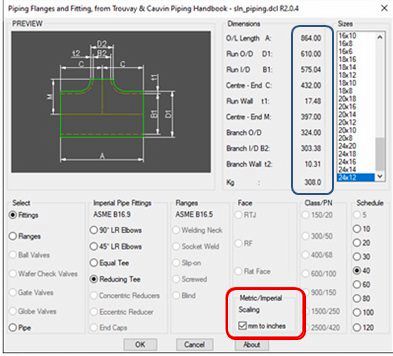
I'm trying to chage the dimensions in the blue highlighted box from mm to inches
Image
.

Here is the code for the 90deg elbow dimensions

Code: Select all

(defun EL90_SETDIM ()
;
	(setvar 'dimzin 0)	
	(setq
		N1 (nth 3 SIZE_DIMS)
		N2 (nth 4 SIZE_DIMS)
		N6 (nth 8 SIZE_DIMS)
		N7 (nth 9 SIZE_DIMS)
		N9 (nth 11 SIZE_DIMS)
	) ;end setq
;  
 (if (= sca "1")(SCA_TO_IMP_EL90)) ;_ end of if
; (if (= SCA "1")(SCA_TO_IMP)) ;_ end of if
;
  (set_tile "n1" (rtos N1 2 2))
  (set_tile "n2" (rtos N2 2 2))
  (set_tile "n3" "")
  (set_tile "n4" "")
  (set_tile "n5" "")
  (set_tile "n6" (rtos N6 2 2))
  (set_tile "n7" (rtos N7 2 2))
  (set_tile "n8" "")
  (set_tile "n9" (rtos N9 2 2))
  (set_tile "n10" "")
  (setvar 'dimzin 8) 
 ;
(princ "\n------ EL90_SETDIM ---------")
(princ "\n O/D N6 = ")
(princ 	N6)
(princ "\n sca = ")
(princ 	sca)
(princ "\n scal = ")
(princ 	scal)
(princ "\n------ EL90_SETDIM ---------")
;  
) ;end of EL90_SETDIM
I have replaced the 'SCA_TO_IMP' with 'SCA_TO_IMP_EL90'
Here is the code for both:

Code: Select all

(defun SCA_TO_IMP ()
  (cond ((= SCA "1")(setq scal "0.039370"))
		(T (setq scal "25.40000"))
		) ;end of cond
;		
  (cond ((= SCAL "1")(setq insertscal "0.039370"))
		(T (setq insertscal "1.000000"))
		) ;end of cond
) ;End SCA_TO_IMP
;-----------------------------------------------------------------------;
(defun SCA_TO_IMP_EL90 ()
  (cond ((= SCA "1")(setq scal "0.039370"))
		(T (setq scal "25.40000"))
		) ;end of cond
		
  (cond ((= SCAL "1")(setq insertscal "0.039370"))
		(T (setq insertscal "1.000000"))
		) ;end of cond
;		
	(setq
      N1  (* N1 (atof scal))
      N2  (* N2 (atof scal))
;      N3  (* N3 (atof scal))
;      N4  (* N4 (atof scal))
;      N5  (* N5 (atof scal))
      N6  (* N6 (atof scal))
      N7  (* N7 (atof scal))
;      N8  (* N8 (atof scal))
      N9  (* N9 (atof scal))
;      N10  (* N10 (atof scal))
	);end of setq
;	
  (set_tile "n1" (rtos N1 2 2))
  (set_tile "n2" (rtos N2 2 2))
  (set_tile "n3" "")
  (set_tile "n4" "")
  (set_tile "n5" "")
  (set_tile "n6" (rtos N6 2 2))
  (set_tile "n7" (rtos N7 2 2))
  (set_tile "n8" "")
  (set_tile "n9" (rtos N9 2 2))
  (set_tile "n10" "")
  (setvar 'dimzin 8) 
 ;
(princ "\n------ SCA_TO_IMP_EL90 ---------")
(princ "\n O/D N6 = ")
(princ 	N6)
(princ "\n sca = ")
(princ 	sca)
(princ "\n scal = ")
(princ 	scal)
;(princ "\n INTERSCAL =")
;(princ 	interscal)
(princ "\n------ SCA_TO_IMP_EL90 ---------")
) ;End SCA_TO_IMP_EL90
As it is sca_to_imp_el90 is ignored.
as only the princs only show EL90 setdims.

However if I remove sca_to_imp, and rename sca_to_imp_90 as sca_to_imp.
swap the ';' in the setdim code to reflect the same change the code works.

this:

Code: Select all

; (if (= sca "1")(SCA_TO_IMP_EL90)) ;_ end of if
 (if (= SCA "1")(SCA_TO_IMP)) ;_ end of if
 
and

Code: Select all

(defun SCA_TO_IMP();_EL90 ()
  (cond ((= SCA "1")(setq scal "0.039370"))
		(T (setq scal "25.40000"))
		) ;end of cond
		
  (cond ((= SCAL "1")(setq insertscal "0.039370"))
		(T (setq insertscal "1.000000"))
		) ;end of cond
;		
	(setq
      N1  (* N1 (atof scal))
      N2  (* N2 (atof scal))
;      N3  (* N3 (atof scal))
;      N4  (* N4 (atof scal))
;      N5  (* N5 (atof scal))
      N6  (* N6 (atof scal))
      N7  (* N7 (atof scal))
;      N8  (* N8 (atof scal))
      N9  (* N9 (atof scal))
;      N10  (* N10 (atof scal))
	);end of setq
;	
  (set_tile "n1" (rtos N1 2 2))
  (set_tile "n2" (rtos N2 2 2))
  (set_tile "n3" "")
  (set_tile "n4" "")
  (set_tile "n5" "")
  (set_tile "n6" (rtos N6 2 2))
  (set_tile "n7" (rtos N7 2 2))
  (set_tile "n8" "")
  (set_tile "n9" (rtos N9 2 2))
  (set_tile "n10" "")
  (setvar 'dimzin 8) 
 ;
(princ "\n------ SCA_TO_IMP_EL90 ---------")
(princ "\n O/D N6 = ")
(princ 	N6)
(princ "\n sca = ")
(princ 	sca)
(princ "\n scal = ")
(princ 	scal)
;(princ "\n INTERSCAL =")
;(princ 	interscal)
(princ "\n------ SCA_TO_IMP_EL90 ---------")
) ;End SCA_TO_IMP
My problem is I have 20 different setdims, each slightly different to the others so I need separate sca to imp for each.
Where am I going wrong, what have I missed/forgotten?
Any help appreciated.

SteveN

Re: IF statement not working?

Posted: Wed Feb 15, 2023 4:19 pm
by SPirou4D
Steve,

Code: Select all

(if (= sca "1")(SCA_TO_IMP_EL90)) 
;(if (= SCA "1")(SCA_TO_IMP)) 
in EL90_SETDIM()

Why sca and not SCA ???

Re: IF statement not working?

Posted: Thu Feb 16, 2023 1:34 am
by sln8458
Patrick,

That was just a 'test'. just in case it worked. a gamble
In this case 'CSA' is a local variable, it could be either upper or lower case.
see here > https://blog.draftsperson.net/autolisp- ... variables/

SteveN

Re: IF statement not working?

Posted: Thu Feb 16, 2023 2:58 am
by SPirou4D
Ok thks I go to read....

Re: IF statement not working?

Posted: Thu Feb 16, 2023 3:05 am
by SPirou4D
:shock:
sln8458 wrote:
Thu Feb 16, 2023 1:34 am
Patrick,

That was just a 'test'. just in case it worked. a gamble
In this case 'CSA' is a local variable, it could be either upper or lower case.
see here > https://blog.draftsperson.net/autolisp- ... variables/

SteveN
But ....

Code: Select all

(setq LIST_MAX 10)
(if (/= LstNdx LIST_MAX)
(do_this))
Why / before the statement = here ??? you must read Constants in your URL please for your script.
Global and local variable in python are more demanding.....

BUT I don't understand your question : "Where am I going wrong, what have I missed/forgotten?"
What is your problem?

Why do you isolate some variable in your SCA_TO_IMP_EL90 () just for EL90.

You must use the global function SCA_TO_IMP() for all dims and make the x for all variables because "" x 1 or25 is always = ""

Re: IF statement not working?

Posted: Thu Feb 16, 2023 4:15 am
by sln8458
SPirou4D wrote:
Thu Feb 16, 2023 3:05 am
BUT I don't understand your question : "Where am I going wrong, what have I missed/forgotten?"
What is your problem?

Patrick,
My IF statement

Code: Select all

 (if (= sca "1")(SCA_TO_IMP_EL90)) ;_ end of if
has no impact.

When the scaling button is selected variable SCA is set to 1.
So, If the scaling button is selected, then apply the scaling factor.

Code: Select all

((= SCA "1")(setq scal "0.039370"))
change the dimension from metric to inches

SteveN

Re: IF statement not working?

Posted: Thu Feb 16, 2023 4:21 am
by SPirou4D
I answer you just before....
SCA_TO_IMP() is just a display function for all kind of object.
if SCA = 1 or SCA = 0.029... the display change.

Re: IF statement not working?

Posted: Thu Feb 16, 2023 4:50 am
by sln8458
SCA will only be either 0 or 1, it is a toggle set by TB24

Code: Select all

	(defun TB24_FLAG ()	;METRIC/IMPERIAL TOGGLE
	(setq sca $value)	;store metric / imperial scale
	);end TB24_FLAG

This drives to set variable scal

Code: Select all

((= SCA "1")(setq scal "0.039370"))
to set variable scal to 0.039370 for inch conversion.
.

Re: IF statement not working?

Posted: Thu Feb 16, 2023 6:03 am
by SPirou4D
Yes off course but I will you understand You need only one function to display all dimensions
not just for one object!

Re: IF statement not working?

Posted: Thu Feb 16, 2023 6:27 am
by sln8458
The attached extract from a much earlier version worked.

Re: IF statement not working?

Posted: Thu Feb 16, 2023 11:25 am
by sln8458
I think I've made some progress, though still not there :(

I have commented out (via ';') any reference to SCA_TO_IMP throughout the code.
Redefined a couple of new functions, EL90SCA_TO_IMP & EL45SCA_TO_IMP

Code: Select all

(defun EL90SCA_TO_IMP ()
  (cond ((= SCA "1")(setq scal "0.039370"))
		(T (setq scal "25.40000"))
		) ;end of cond
;		
	  (cond ((= SCA "1")(setq insertscal "0.039370"))
		(T (setq insertscal "1.000000"))
		) ;end of cond
;
  (setq
      N1  (* N1 (atof scal))
      N2  (* N2 (atof scal))
      N6  (* N6 (atof scal))
      N7  (* N7 (atof scal))
      N9  (* N9 (atof scal))
	 );end of setq
;
  (set_tile "n1" (rtos N1 2 2))
  (set_tile "n2" (rtos N2 2 2))
  (set_tile "n3" "")
  (set_tile "n4" "")
  (set_tile "n5" "")
  (set_tile "n6" (rtos N6 2 2))
  (set_tile "n7" (rtos N7 2 2))
  (set_tile "n8" "")
  (set_tile "n9" (rtos N9 2 2))
  (set_tile "n10" "")
  (setvar 'dimzin 8)  
;
(princ "\n--")
(princ "\n------ EL90IMP_SETDIM ---------")
(princ "\n O/D N6 = ")
(princ 	N6)
(princ "\n sca = ")
(princ 	sca)
(princ "\n scal = ")
(princ 	scal)
(princ "\n insertscal = ")
(princ 	insertscal)
(princ "\n------ EL90IMP_SETDIM ---------") 
) ;End EL90SCA_TO_IMP						
;------------------------------------------------------------------------;
(defun EL45SCA_TO_IMP ()
  (cond ((= SCA "1")(setq scal "0.039370"))
		(T (setq scal "25.40000"))
		) ;end of cond
;		
	  (cond ((= SCA "1")(setq insertscal "0.039370"))
		(T (setq insertscal "1.000000"))
		) ;end of cond
;
  (setq
      N1  (* N1 (atof scal))
      N2  (* N2 (atof scal))
      N3  (* N3 (atof scal))
      N6  (* N6 (atof scal))
      N7  (* N7 (atof scal))
      N9  (* N9 (atof scal))
	 );end of setq
;
  (set_tile "n1" (rtos N1 2 2))
  (set_tile "n2" (rtos N2 2 2))
  (set_tile "n3" (rtos N3 2 2))  
  (set_tile "n4" "")
  (set_tile "n5" "")
  (set_tile "n6" (rtos N6 2 2))
  (set_tile "n7" (rtos N7 2 2))
  (set_tile "n8" "")
  (set_tile "n9" (rtos N9 2 2))
  (set_tile "n10" "")
  (setvar 'dimzin 8)  
;
(princ "\n--")
(princ "\n------ EL45IMP_SETDIM ---------")
(princ "\n O/D N6 = ")
(princ 	N6)
(princ "\n sca = ")
(princ 	sca)
(princ "\n scal = ")
(princ 	scal)
(princ "\n insertscal = ")
(princ 	insertscal)
(princ "\n------ EL45IMP_SETDIM ---------") 
) ;End EL45SCA_TO_IMP
;------------------------------------------------------------------------;										   
(defun EL90_SETDIM ()
;  
;  (if (= SCA "1")(SCA_TO_IMP_EL90)) ;_ end of if
;
	(setvar 'dimzin 0)	
	(setq
		N1 (nth 3 SIZE_DIMS)
		N2 (nth 4 SIZE_DIMS)
		N6 (nth 8 SIZE_DIMS)
		N7 (nth 9 SIZE_DIMS)
		N9 (nth 11 SIZE_DIMS)
	) ;end setq
;  
 (if (= SCA "1")(EL90SCA_TO_IMP)) ;_ end of if
;
  (set_tile "n1" (rtos N1 2 2))
  (set_tile "n2" (rtos N2 2 2))
  (set_tile "n3" "")
  (set_tile "n4" "")
  (set_tile "n5" "")
  (set_tile "n6" (rtos N6 2 2))
  (set_tile "n7" (rtos N7 2 2))
  (set_tile "n8" "")
  (set_tile "n9" (rtos N9 2 2))
  (set_tile "n10" "")
  (setvar 'dimzin 8)  
) ;end of EL90_SETDIM
;-----------------------------------------------------------------------;
(defun EL45_SETDIM ()
	(setvar 'dimzin 0)	
  (setq
    N1 (nth 3 SIZE_DIMS)
    N2 (nth 4 SIZE_DIMS)
    N3 (nth 5 SIZE_DIMS)	
    N6 (nth 8 SIZE_DIMS)
    N7 (nth 9 SIZE_DIMS)
    N9 (nth 11 SIZE_DIMS)
  ) ;end setq
;  
  (if (= SCA "1")(EL45SCA_TO_IMP)) ;_ end of if	
; 
  (set_tile "n1" (rtos N1 2 2))
  (set_tile "n2" (rtos N2 2 2))
  (set_tile "n3" (rtos N3 2 2))  
  (set_tile "n4" "")
  (set_tile "n5" "")
  (set_tile "n6" (rtos N6 2 2))
  (set_tile "n7" (rtos N7 2 2))
  (set_tile "n8" "")
  (set_tile "n9" (rtos N9 2 2))
  (set_tile "n10" "")
  (setvar 'dimzin 8)  
) ;end of EL45_SETDIM
;-----------------------------------------------------------------------;
Also I have changes the action tile code for TB24:

Code: Select all

	(action_tile "tb24" 								;toggle Imperial Scale
;
;	"(cond ((= fred1 \"sre90_\")
;		(progn
;			(TB24_FLAG)
;			(EL90SCA_TO_IMP)
;		)
;		)
;			((= fred1 \"sre90_\")
;		(progn
;			(TB24_FLAG)
;			(EL45SCA_TO_IMP)
;		)
;		)
;		(t  (MAIN_DIM)
;		)
;	)"		
		(strcat		
			"(TB24_FLAG)"
			"(EL90SCA_TO_IMP)"				;(EL45SCA_TO_IMP)"
		); end strcat		
	); END ACTION TILE
As this code stands ALL 90 deg elbows are drawn correctly and their dimensions are displayed correctly both in metric and imperial.
However I have failed to add the EL45SCA_TI_IMP and get it to work.
As you can see I've tried 'strcat' and using a condition statement, both fail.

Can anyone point me to some reading material to try to understand my failings?
Steve

Re: IF statement not working?

Posted: Fri Feb 17, 2023 1:59 am
by sln8458
Well, I think I've resolved my problem :)
All down to the Action Tile TB24 statement.

Here is my new code, note only the 90 & 45 deg elbows atm.

Code: Select all

	(action_tile "tb24" 								;toggle Imperial Scale
;
	"(cond 
		((= fred1 \"sre90_\")
		(progn
			(TB24_FLAG)
			(EL90SCA_TO_IMP)
		)
		)
		((= fred1 \"lre90_\")
		(progn
			(TB24_FLAG)
			(EL90SCA_TO_IMP)
		)
		)
		((= fred1 \"3de90_\")
		(progn
			(TB24_FLAG)
			(EL90SCA_TO_IMP)
		)
		)
		((= fred1 \"5de90_\")
		(progn
			(TB24_FLAG)
			(EL90SCA_TO_IMP)
		)
		)
		((= fred2 \"sre45_\")
		(progn
			(TB24_FLAG)
			(EL45SCA_TO_IMP)
		)
		)
		((= fred2 \"lre45_\")
		(progn
			(TB24_FLAG)
			(EL45SCA_TO_IMP)
		)
		)
		((= fred2 \"3de45_\")
		(progn
			(TB24_FLAG)
			(EL45SCA_TO_IMP)
		)
		)
		((= fred2 \"5de45_\")
		(progn
			(TB24_FLAG)
			(EL45SCA_TO_IMP)
		)
		)
		(t (progn
			(setq newtile $key)
			(TB24_FLAG)
		)
		)
	)"	
	); END ACTION TILE
Now to test some more before moving on to the rest!!

SteveN

Re: IF statement not working?

Posted: Fri Feb 17, 2023 3:38 am
by SPirou4D

Code: Select all

(action_tile "tb24" 	;toggle Imperial Scale
	"(cond 
		((= fred1 \"sre90_\") (progn (TB24_FLAG) (EL90SCA_TO_IMP)))
		((= fred1 \"lre90_\") (progn (TB24_FLAG) (EL90SCA_TO_IMP)))
		((= fred1 \"3de90_\") (progn (TB24_FLAG) (EL90SCA_TO_IMP)))
		((= fred1 \"5de90_\") (progn (TB24_FLAG) (EL90SCA_TO_IMP)))
		((= fred2 \"sre45_\") (progn (TB24_FLAG) (EL45SCA_TO_IMP)))
		((= fred2 \"lre45_\") (progn (TB24_FLAG) (EL45SCA_TO_IMP)))
		((= fred2 \"3de45_\") (progn (TB24_FLAG) (EL45SCA_TO_IMP)))
		((= fred2 \"5de45_\") (progn (TB24_FLAG) (EL45SCA_TO_IMP)))
		(t (progn(setq newtile $key) (TB24_FLAG)))
	)"	
); END ACTION TILE
That! what is the diff between fred1 and fred 2, please?

You can write this too:

Code: Select all

((= fred1 'sre90_') (progn (TB24_FLAG) (EL90SCA_TO_IMP)))

Re: IF statement not working?

Posted: Fri Feb 17, 2023 3:52 am
by sln8458
fred1 is the variable I used in the 90deg Elbow dialog to store bend radii selection:
SR
LR
3D
5D

And fred2 is the same but for the 45deg Elbows.

Yes, very appropriate I know :) :)

Also

Code: Select all

((= fred1 'sre90_') (progn (TB24_FLAG) (EL90SCA_TO_IMP)))
That does look neater.
I am still a novice at LISP!
I write the code in a way that helps me understand, and once working I forget to comeback and tidy up :oops:
Thanks for the tip, every day is a learning day. :lol:

SteveN

Re: IF statement not working?

Posted: Fri Feb 17, 2023 4:03 am
by SPirou4D
:wink: