Page 1 of 1
AEC Wall Area - Incorrect
Posted: Mon Feb 13, 2023 8:34 am
by buck_taylor
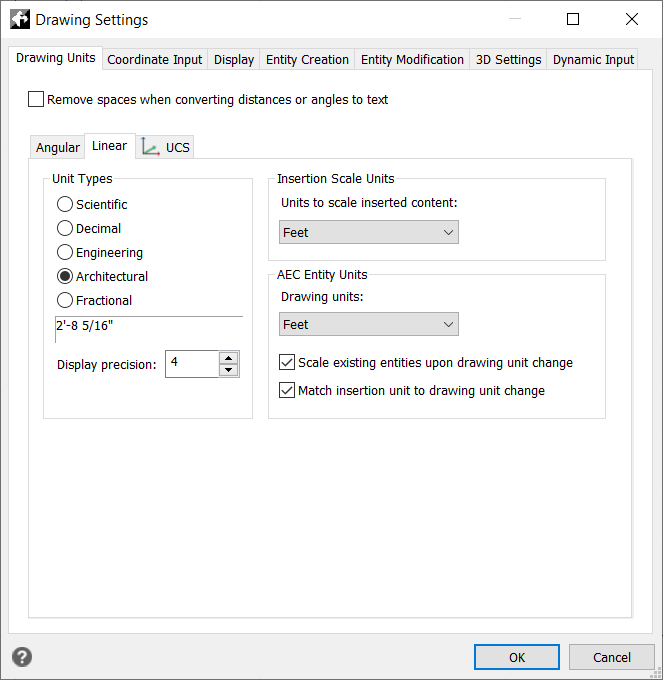
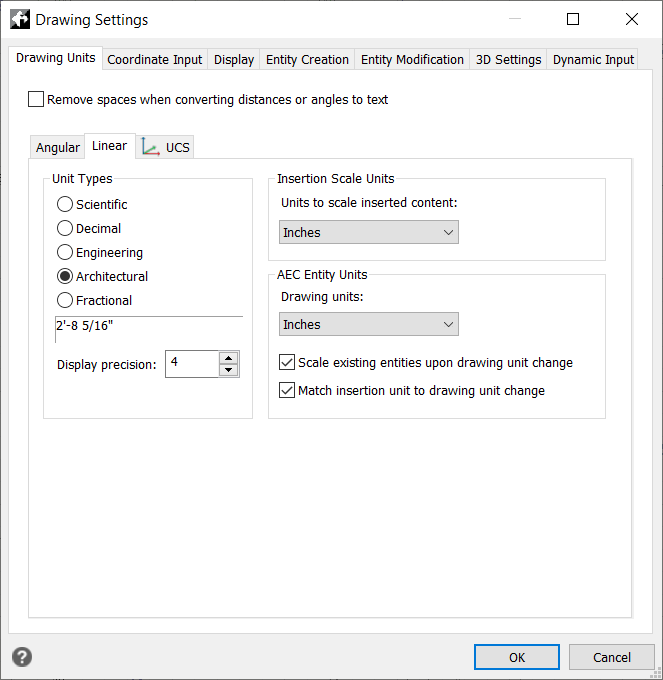
When using "Architectural" in drawing settings;
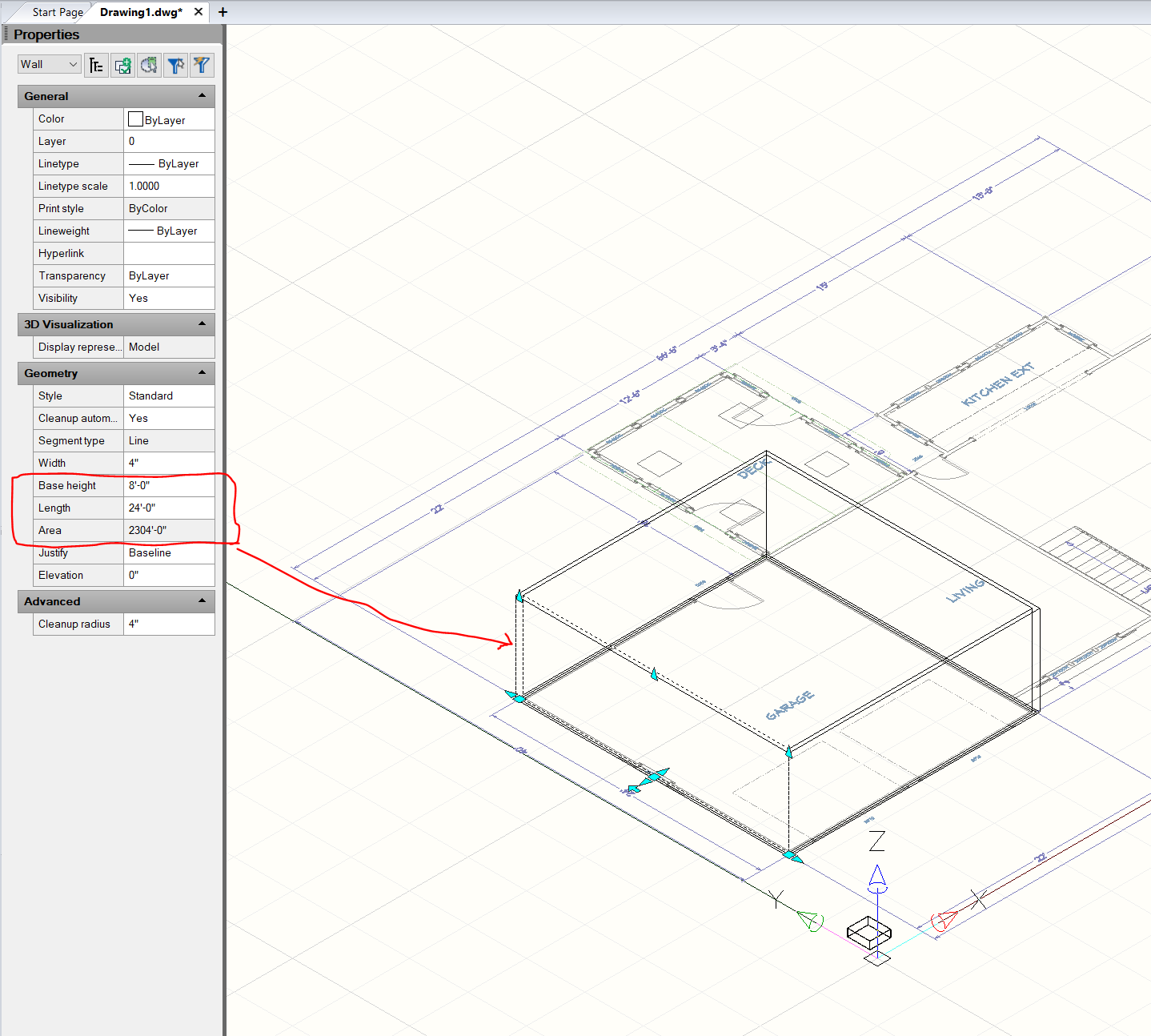
when I select a wall, the dimensions of the wall show correctly, however the conversion to square feet for area is incorrect. In the example image I show an 8 feet wall by 24 feet long. That should equal 192 square feet - NOT the 2304 feet shown. When I use scientific in inches it shows the same wall as 96 inches by 288 inches and calculate the square inches as 27,648 square inches (which is correct). To convert from square inches to square feet you divide the square inches by 144 (not 12).
I should also note - when I change from Decimal (inches) to Architectural and select "feet" as the units, my walls are deleted from the drawing with no warning or messages in the command line.
Re: AEC Wall Area - Incorrect
Posted: Mon Feb 13, 2023 6:35 pm
by QuanNguyen
Hi,
What version of IntelliCAD do you use now?
Here's the result on the 11.1 version.

- drawing units.png (38.7 KiB) Viewed 7963 times
Re: AEC Wall Area - Incorrect
Posted: Tue Feb 14, 2023 12:31 pm
by buck_taylor
CMS IntelliCAD11.1x64 Premium Edition Plus
Re: AEC Wall Area - Incorrect
Posted: Wed Feb 15, 2023 6:04 am
by SPirou4D
QuanNguyen wrote: ↑Mon Feb 13, 2023 6:35 pm
Hi,
What version of IntelliCAD do you use now?
Here's the result on the 11.1 version.
drawing units.png
You draw 8" base height and not 8' I mean?
Re: AEC Wall Area - Incorrect
Posted: Wed Feb 15, 2023 6:11 am
by SPirou4D
buck_taylor wrote: ↑Mon Feb 13, 2023 8:34 am
when I select a wall, the dimensions of the wall show correctly, however the conversion to square feet for area is incorrect. In the example image I show an 8 feet wall by 24 feet long. That should equal 192 square feet -
What is the nature of your wall, please? 3D Solid or AEC ? Your wall isn't created in IntelliCAD : Standard??? AEC Walls are exterior or interior!

- capture_162.jpg (201.17 KiB) Viewed 7935 times
Here AEC Interior :
8 feet x 24 feet = 2.444m x 7.32m = 17.86 m2
8 feet x 24 feet = 192 feet square or 192 x 0,093025m2 = 17.8608 m2
Re: AEC Wall Area - Incorrect
Posted: Wed Feb 15, 2023 12:46 pm
by buck_taylor
I am drawing AEC walls. I get the same results regardless of whether they are Interior or Exterior Walls.
Re: AEC Wall Area - Incorrect
Posted: Wed Feb 15, 2023 1:20 pm
by buck_taylor
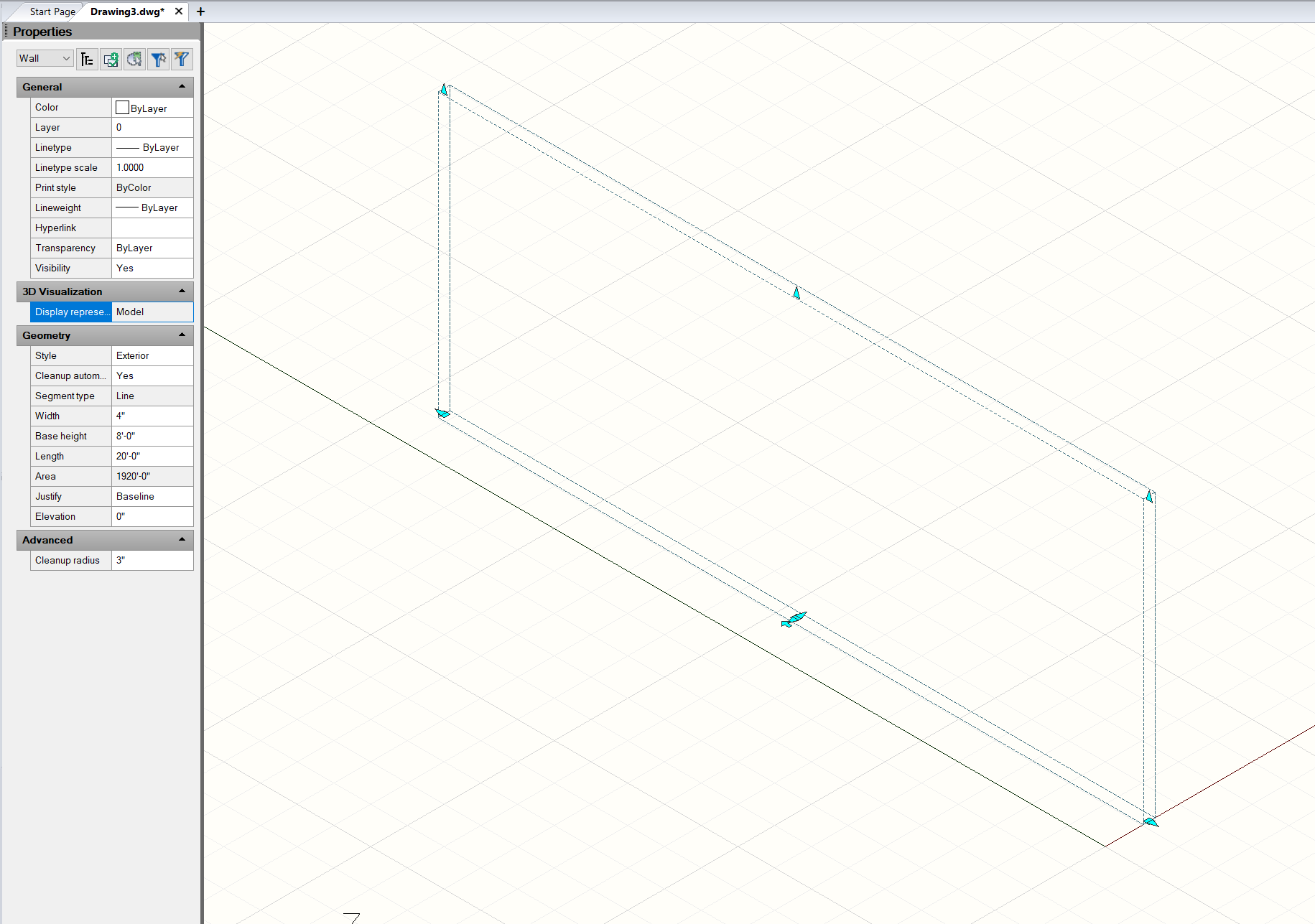
Drawing an Exterior AEC Wall, using FEET and AEC linear dimensions:
Results: 8' (ft) x 20' (ft) wall is 1920' (ft)
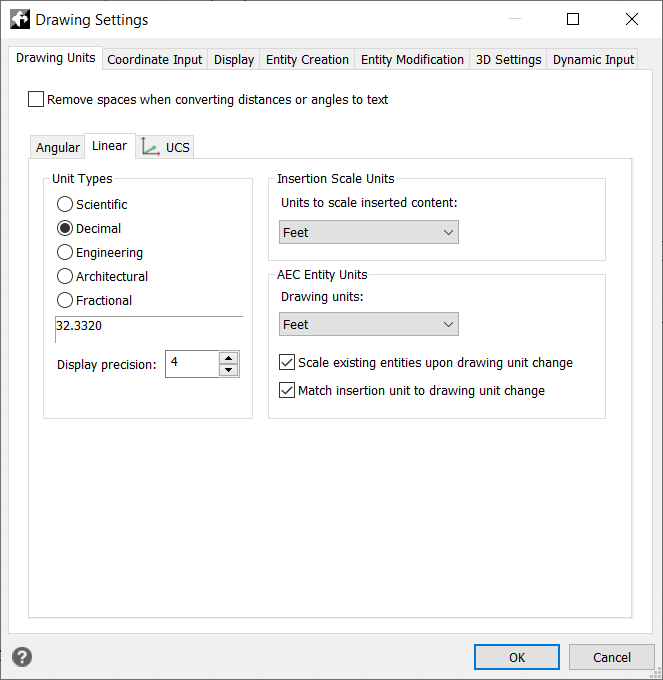
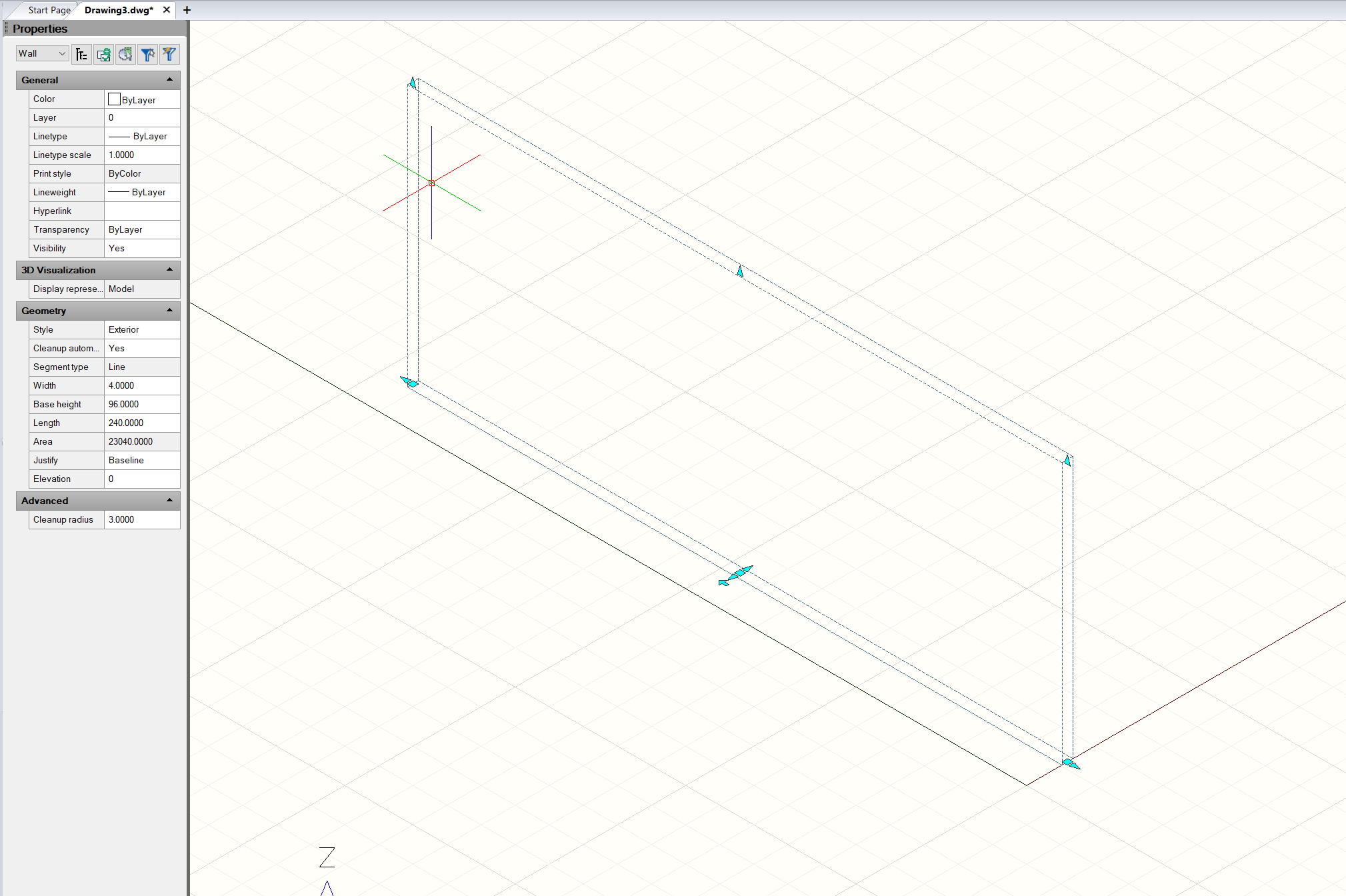
If I change to DECIMAL units:
The application displays INCHES even though it is set to FEET. The area in square inches is correct (for inches), but not for feet
I have tried reinstalling the application. If I create a new drawing using the guide and select METRIC, I don't get metric screens or units - they are still IP. There are a bunch of issues with this app, that are really frustrating....
Re: AEC Wall Area - Incorrect
Posted: Thu Feb 16, 2023 4:40 am
by SPirou4D
EDIT : Haaaarrrr I understand what you say: the area is in inch and not in feet! Weird!!!!
Wait a minute I will mean about this....
Re: AEC Wall Area - Incorrect
Posted: Thu Feb 16, 2023 5:00 am
by SPirou4D

- capture_163.jpg (223.38 KiB) Viewed 7909 times

- capture_164.jpg (121.37 KiB) Viewed 7909 times
You are right the area is 1920' or it's 1920 inch !!!!! IntelliCAD don't display the good units !
Re: AEC Wall Area - Incorrect
Posted: Thu Feb 16, 2023 5:20 am
by SPirou4D

- capture_166.jpg (233.86 KiB) Viewed 7907 times
I tried in Inch but no change the result is 1960' 0"
Even I change the AEC units !!!! Same result : 1960 feet at the place of 1960 inch!!!!
If I list the information:
Commande: _LIST----------------------- AEC_WALL ----------------------------------
Poignée: 537
Espace actuel: Espace modèle
Calque: 0
Couleur: DUCALQUE
Type de ligne: BYLAYER
Epaisseur de ligne: 0.00 mm
Style: Exterior
Segment type: Line
Width: 4"
Height: 8'-0"
Length: 20'-0"
BUT the area is not in the list!!!
I tried in metric and the résult is exact : 2.4384m x 6.0960 m = 14.8645 m2
Re: AEC Wall Area - Incorrect
Posted: Thu Feb 16, 2023 5:52 am
by SPirou4D
If you change the units and your AEC disapear it's normal : use zoom extended to see your object!
 when I select a wall, the dimensions of the wall show correctly, however the conversion to square feet for area is incorrect. In the example image I show an 8 feet wall by 24 feet long. That should equal 192 square feet - NOT the 2304 feet shown. When I use scientific in inches it shows the same wall as 96 inches by 288 inches and calculate the square inches as 27,648 square inches (which is correct). To convert from square inches to square feet you divide the square inches by 144 (not 12).
 I should also note - when I change from Decimal (inches) to Architectural and select "feet" as the units, my walls are deleted from the drawing with no warning or messages in the command line.