• Download & Store

    Download now!

    ETOOLBOX Free CAD Viewer
    QuoteCAD Manufacturing

    Store - Buy Online


    • Standalone perpetual licenses
    • Network Floating Licenses
    • Subscription Licenses
    • Upgrade Licenses
    • Dedicated Support
    • Learn CAD online

  • Login
  • Register
    • Download & Store

      Download now!

      ETOOLBOX Free CAD Viewer
      QuoteCAD Manufacturing

      Store - Buy Online


      • Standalone perpetual licenses
      • Network Floating Licenses
      • Subscription Licenses
      • Upgrade Licenses
      • Dedicated Support
      • Learn CAD online

    • Unanswered topics
    • Active topics
  1. Home
  2. Board index
  3. CMS IntelliCAD
  4. General

tool bar not loaded

Moderator: CMS Inc

  • Print view
Post Reply
  1. Home
  2. Board index
  3. CMS IntelliCAD
  4. General
2 posts
Display posts from previous
Sort by
sue
sue
Rank:
Newbie
Posts:
2
Joined:
Tue Dec 14, 2021 11:23 am

tool bar not loaded

#1 by sue
I have just purchased and downloaded I
ntellicad PE (twice) and can not get the tool bars to load.
Can someone help please?
The demo I tried worked perfectly...
  • Quote
  • Tue Dec 14, 2021 12:29 pm
User avatar
sln8458
Rank:
Valued Contributor
Posts:
765
Joined:
Mon May 19, 2003 11:01 pm
Contact:
  • Website

Re: tool bar not loaded

#2 by sln8458
Hi Sue
How are you loading the toolbars?

Try this:
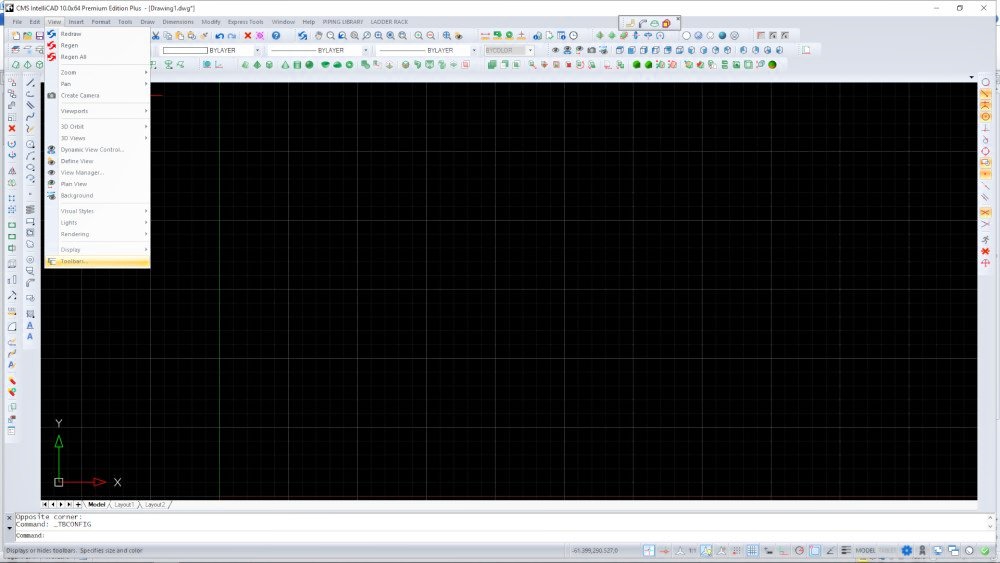
From the top menu
Select 'View'
Image
.
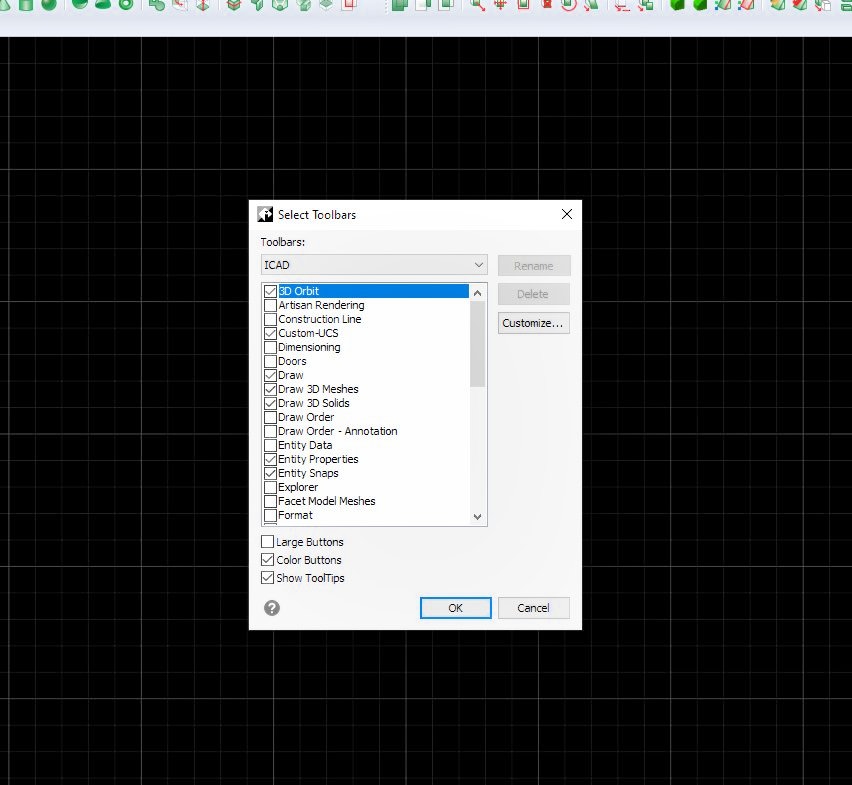
Then at the bottom of the list select 'Toolbars'
Here is where you can turn the individual toolbar display 'ON/OFF'
Image
HTH
SteveN
  • Quote
  • Wed Dec 15, 2021 2:48 am

Latest Posts
2 posts
Post Reply

Return to “General”

Jump to
  • CMS IntelliCAD
  • -     FAQ - Frequently Asked Questions
  • -     General
  • -     AutoLisp/SDS
  • -     VBA, . NET & IRX
  • -     -     FAQ
  • -     New User
  • -     Small Business
  • -     Realistic Rendering
  • -     Bonus
  • -     Free CAD .DWG Blocks
  • -     License Management
  • -     Store, Accounts and Purchases
  • -     Academic
  • QuoteCAD Manufacturing
  • -     General
  • -     Quotation and Manufacturing
  • -     Database Manager
  • -     License Management
  • ETOOLBOX CAD Viewer
  • -     General
  • -     License management
iCAD v15 failed creation of c…
Hi i'm an updater from v12.1 and had to uninstall v15 (manteinance updated) and run back to v12.1 cause with v15 it
ant64, Fri Oct 09, 2026 8:51 am
Artisan with cms 15
Hi everyone, is it possible to use Artisan 1.1 (which I used with CMS 12) in version 15? Thank you.
magh10, Fri Oct 09, 2026 12:31 am
User avatar
Re: [v15.0] DISTANCE command …
The fix will be available on the next maintenace build.
CMS Inc, Tue Oct 06, 2026 1:48 pm
Re: [v15.0] DISTANCE command …
I installed maintenance build 15.0.587.175583.PE+.VC17.x64.CMS150, but the problem persists; it doesn't happen cons
andcip, Tue Oct 06, 2026 12:11 pm

  • Home
  • Board index
  • FAQ
  • Privacy
  • Terms
  • All times are UTC-06:00
  • It is currently Sun Oct 11, 2026 7:48 am
Copyright © 1993-2026 CAD-Manufacturing Solutions, Inc. All rights reserved. ETOOLBOX , QUOTECAD and CADhobby are CMS, Inc. US trademarks no. 4,374,633 ; 3,463,607 and 7,391,196 respectively.
Avatar icons made by Freepik from www.flaticon.com

Login


Register