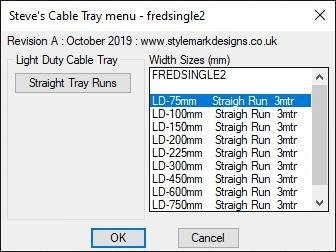
HI,
Thanks for the help.
I have done as you suggested, however it still does not work, but there is progress I think.
(Note: I have added a second button to the DCL for ldct2, in the lsp file this inserts an existing block 'nut_ac.dwg')
Here is the code:
Code: Select all
(defun
   INSERT_BLOCK1 ()
  (command
	"._-insert" "nut_ac" pause 1 1 0	;INSERT BLOCK 1
   ) ;_ end of command
) ;end INSERT_BLOCK1
(defun
   INSERT_BLOCK2 ()
  (command
	"._-insert" D pause 1 1 0		;INSERT BLOCK 2
   ) ;_ end of command
) ;end INSERT_BLOCK2
Here is the command history from Intellicad:
Command:
Command:
Rendering support loaded.
Raster image support loaded.
Command;
Command: fredsingle2
<Select insert point>/Reference:
Command: ._-insert
? to list blocks in drawing/BROWSE/EXPLORE/<Block to insert>: nut_ac
Scale/X/Y/Z/Rotation/Multiple/<Insertion point for block>:
Corner/XYZ/X scale factor <1.000000>: 1
Y scale factor: < Equal to X scale (1.000000)>: 1
Rotation angle for block <0>: 0
Command:
Command: fredsingle2
<Select insert point>/Reference:
Command: '_PMTHIST
And here is the Intellicad command history with the code (command "._-insert" "D" pause 1 1 0 ;INSERT BLOCK 2
Code: Select all
Command:
Command:
Rendering support loaded.
Raster image support loaded.
Command:
Command: fredsingle2
<Select insert point>/Reference:
Command: ._-insert
? to list blocks in drawing/BROWSE/EXPLORE/<Block to insert>: nut_ac
Scale/X/Y/Z/Rotation/Multiple/<Insertion point for block>:
Corner/XYZ/X scale factor <1.000000>: 1
Y scale factor:  < Equal to X scale (1.000000)>: 1
Rotation angle for block <0>: 0
Command:
Command: fredsingle2
Command: ._-insert
? to list blocks in drawing/BROWSE/EXPLORE/<Block to insert> <nut_ac>: D
-- Could not find file D.DWG. --
Error: Function cancelled
Command: '_PMTHIST
S